Turn Visitor Questions Into

Resolved Conversations

Add an AI assistant widget to your website in under 10 minutes — one script tag, zero code. It answers instantly from your actual content, cutting down repetitive support questions before they ever reach your inbox. Anything it can't resolve gets routed straight to a feedback form — so you never lose a lead or a frustrated visitor.

Work on — Any website

Multiple styles — one script

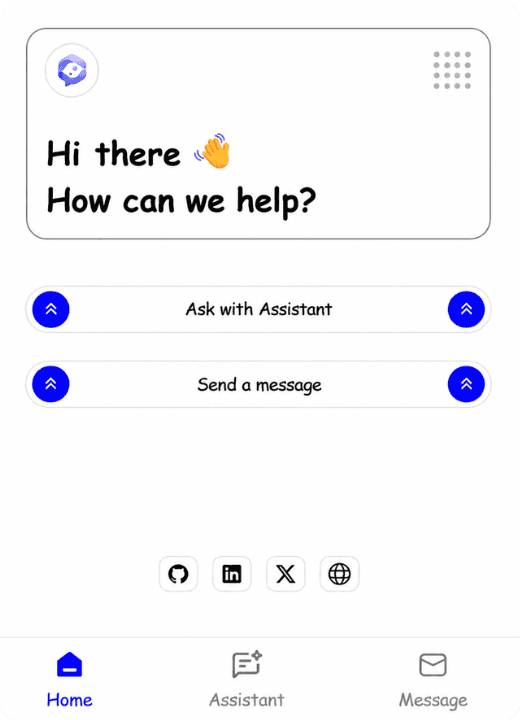
A centered compact bar that feels native to your page, or a floating assistant avatar in the corner — both powered by the same AI.

Fully customizable to match your brand — colors, fonts, and layout

with no WidgIq branding on the widget. It feels like yours, because it is.

Try the Compact style on this page, or see the Floating style in action on my.

Powered By

Gemini
FireCrawl
Groq

What's makes it — Different

WidgIq isn't just a widget you embed and forget. From deep customization to real visitor insights, everything that makes your assistant smarter and your workflow easier lives right here.

Tailored Experience

Match your brand without coding.

Type
Brand
Page Visibility
Themes
Fonts
Colors

Deep customization

Colors, fonts, page visibility or widget type — control everything from dashboard. No code changes, no redeploys, no waiting for a developer.

AI-powered widget with contact form

Nothing is lost — every query resolved or routed.

Auto-Detect
Inline Button
One Click
No Searching
Instant
Escalation

One-click contact form

The moment the assistant suggests reaching out for help, a clickable button appears right inside the chat — no hunting for a contact link.

Real-time visitor insights

Get instant feedback from your visitors on AI responses.

Thumbs Up
Thumbs Down
Flag Answer
Mark Resolved
Dashboard View
Improve KB

Visitor feedback on every answer

Visitors can thumbs up or down any AI response. See exactly which answers fell short, update your knowledge base — right from the dashboard.

Knowledge Base

Stack your docs, URLs, and data sources.

PDFs
Docs
URLs
Description
Sheets
Sitemaps

Flexible knowledge base

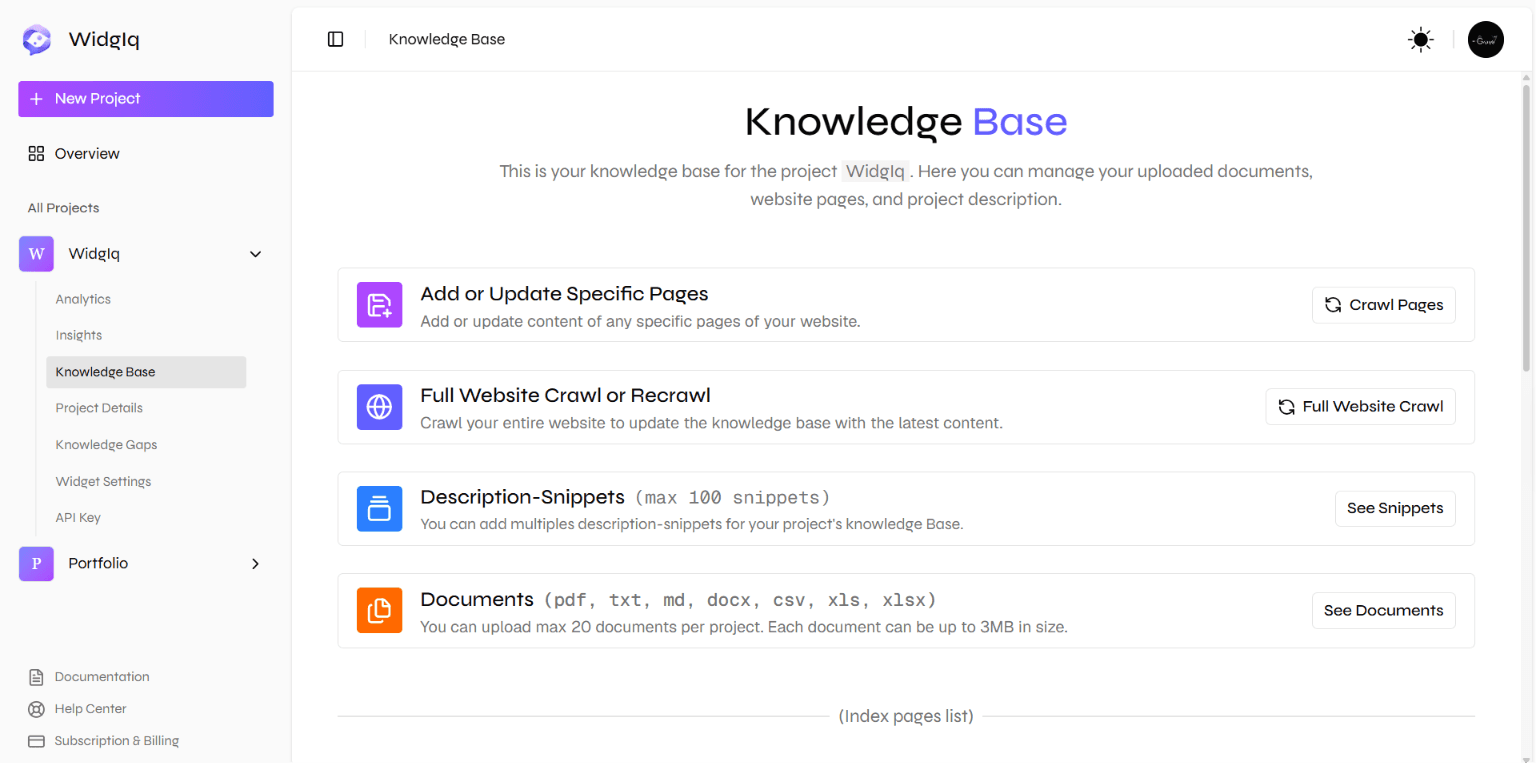
Crawl your site, write a custom description, or upload PDFs — mix and match, then update anytime as your product evolves.

Smart Routing

Queries flow to the right source instantly.

Routing
Fallback
Priority
Latency
Caching
Escalation

Built-in escalation

When the assistant can't answer, visitors are routed to a feedback or contact form instead of hitting a dead end.

Zero Setup
Deploy in minutes with one script.
Any website
Zero dependencies
No npm install
No build step
CDN delivered
<15kb gzipped

Extremely lightweight

A single JS file. No npm install, no build step, no framework required. If your site can load a script tag, it can run WidgIq.

Instant Feedback

Responses appear as they are generated.

Groq
Gemini
Firecrawl
Instant
Response
History

Streaming responses

Responses stream token by token — no waiting for the full answer to load. Feels instant, keeps users engaged, just like ChatGPT.

Reliable Answers

Grounded in your knowledge base.

Embeddings
Chunking
Indexing
Retrieval
Reranking
Context

Excellent RAG pipeline

Backed by a serious retrieval-augmented generation system. Your assistant answers from your actual content — not hallucinations.

Speaks any language

Communicate seamlessly in any language

English
Spaniards
French
German
Japanese
Hindi

Speaks any language

Your visitors ask in their own language — English, Hindi, Spanish, French, whatever — and the assistant replies in kind. No setup needed.

Request analytics

Track daily and total request counts, so you can see engagement grow as your widget usage scales.

How does it know my site content?
How does WidgIq understand my website?

Questions History

Discover what users ask most often.

Questions history

Browse the most frequently asked questions, so you always know what your audience is curious about.

Weekly AI Analysis

AI-generated insights from user activity.

Questions
Summary
Suggestions
Recommendations
Analytics
Settings

Weekly AI analysis

Every week, WidgIq analyzes your visitors&apos; questions automatically and surfaces actionable insights.

12.5%

Credits & Usage

Monitor credits and consumption rates.

Credits Remaining
Usage Share
AI Requests
Weekly Analysis
Project Setup
Recrawling

Credits & usage

Keep an eye on your credit consumption and remaining balance, right from the dashboard.

Multi-project support

Manage multiple projects seamlessly

NexMeet
NexFlow
BeBetter AI
GroundUp Pulse
WidgIq
Portfolio

Multi-project support

Run separate widgets for separate sites or products, each with its own knowledge base, API key, and analytics — all from one dashboard.

Is This You? — Then WidgIq Fits

WidgIq isn't built for every website — it's built for the ones still figuring things out. If any of this sounds like you, you're exactly who we made this for.

Validating an MVP

Testing an idea and don't have time to build a support system? Let WidgIq answer visitor questions and collect feedback for you, so you can focus on the product, not on replying to every message yourself.

Solo founders & small teams

No support team, no problem. WidgIq handles the repetitive questions around the clock, so you're not stuck answering the same thing over and over between everything else you're doing.

Busy building, not answering

Every hour spent replying to visitor questions is an hour not spent building. WidgIq takes that off your plate, so you can stay focused on what actually moves your product forward.

Non-technical site owners

You don't need to write a single line of code or hire a developer. Add one script tag, and your site has an assistant that already knows your content.

Getting real visitor feedback

Not sure what visitors are confused about or what's missing from your site? WidgIq collects their questions and feedback for you, so you learn what to fix without having to ask.

Launching on a budget

Hiring support staff or building a custom help-desk isn't realistic this early. WidgIq gives you the same coverage for a fraction of the cost and none of the setup.

Never missing a question

A visitor with an unanswered question usually just leaves. WidgIq makes sure someone (or something) is always there to respond, even outside your working hours.

Managing multiple projects

Running more than one website or product? Set up a WidgIq assistant for each one in minutes, and manage all of them from a single dashboard.

Watch — Our Demo

Hero Video

How it — Works

1

Create a project

Add your website to the WidgIq dashboard — or skip the crawl entirely. Build your knowledge base your way: let Firecrawl crawl your pages, add a custom description, or upload PDFs — mix and match as needed. You can update your knowledge base anytime — crawl specific pages, refresh existing ones, run a full re-crawl, or delete a page's content whenever you want.

2

Grab your API key

Each project gets a unique API key. This is what connects the widget on your site to your knowledge base in the cloud.

3

Embed the script

Paste one <script> tag into your site with your API key. Once deployed on your verified domain, the widget appears and responds instantly — it won't respond on localhost since we validate origin for security.

4

Customize the widget

Choose a theme type, color scheme and other options to match your site. You can customize anytime from the dashboard — no development site needed, changes apply instantly.

5

Your visitors get answers

When someone asks a question, the RAG system retrieves the most relevantcontent and streams a precise, grounded answer back in real time. If the assistant can't resolve a query, the visitor is guided to a feedback orcontact form — so bugs, feature requests, and complaints reach you directly instead of getting lost.

Simple and Honest — Pricing

No monthly or annual subscriptions. Pay once to unlock, and top up credits
when you need more.

One-time unlock

$9 one time

Unlock full access. Buy more credits anytime — only pay for what you use.

5,000 credits included — Credits never expire
Get Started

Create unlimited projects

Request analytics & insights

Top questions history

Weekly AI analysis reports

Anytime full & custom recrawling

Complete widget customization

Built-in feedback & contact form

Crawl, description & PDF knowledge base

No WidgIq branding on widget

All future features included

Frequently — Asked Questions

Here are some common questions and answers that you might encounter when using WidgIq.
If you don't find the answer you're looking for, feel free to reach out.

Need a — Hand?

Whether you're stuck on setup or running into an issue, we're here to help.
Reach out anytime — no question is too small.

Book a Call

Got questions, need a demo, or stuck on something? Jump on a quick call — we'll sort it out together.

Send us an email

Prefer async? Drop us an email at for setup help, bug reports, or anything else — we'll get back to you fast.

Your website — upgraded

One Tag. Smarter website.

Your visitors have questions. Give them answers, instantly — and never lose the ones your AI can't.

<script data-widgiq-widget data-api-key="..." ></script>
WidgIq Logo

WidgIq

All Systems Operational

Made with ❤️ byGaurav